Project summary
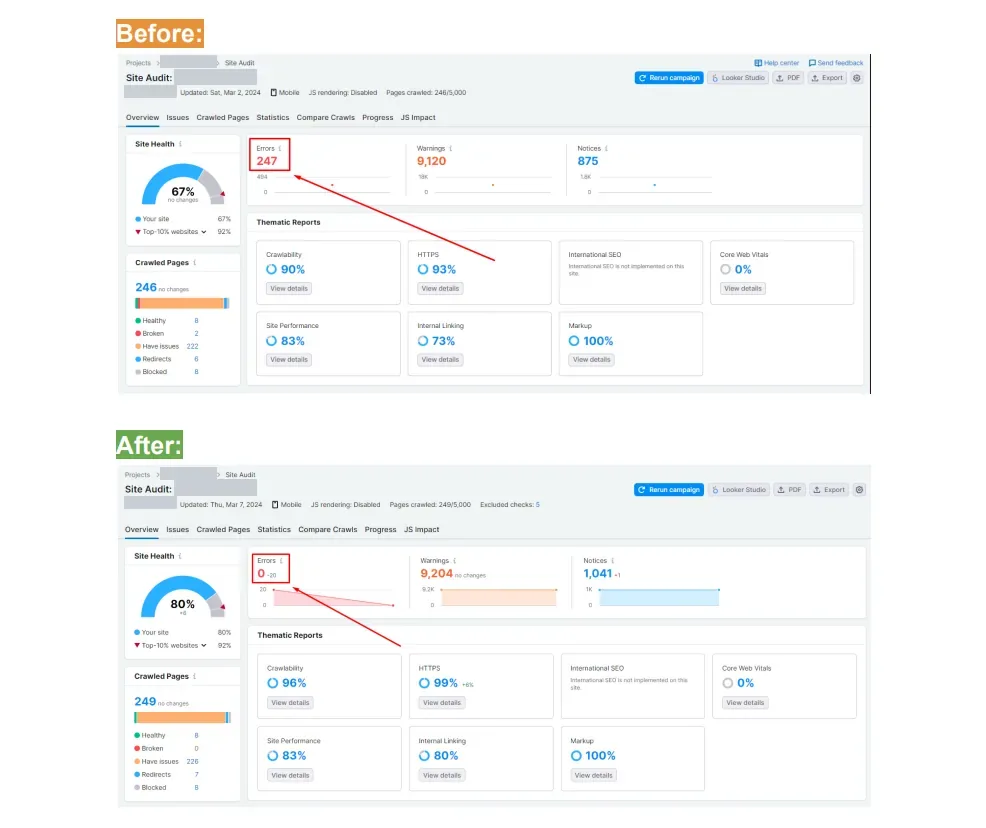
The client’s goal was clear: fix every SEO error Semrush had found on their WordPress website, on-page and technical. Our team fixed all of them in five days and raised site health from 67% to 80%.
Figures are taken from the client’s before-and-after Semrush Site Audit reports. The web address is hidden.
Why audit errors matter
Audit tools crawl a site much like Google does and highlight obstacles such as broken URLs, crawl blocks, HTTPS faults and thin internal linking. Semrush ranks errors as the highest-priority issue type. Fixing them does not guarantee rankings, but it removes obstacles between the site and Google.
The starting point: audit on 2 March 2024
- Site health: 67%.
Errors: 247. Warnings: 9,120. Notices: 875.
Crawl covered 246 pages, of which 2 were broken.
Category scores before: crawlability 90%, HTTPS 93%, internal linking 73%.
The situation in more detail
The client asked for one clear outcome: clear every on-page and technical error flagged by Semrush. Errors are the most serious category in Semrush Site Audit, above warnings and notices. They usually point to problems that directly affect crawling, indexing or user experience, such as broken pages.
Our strategy: fix causes, not lines
A list of 247 errors looks scary, but most come from a few causes: a template problem, a redirect pattern or a broken link repeated across pages. Sorting the errors into types up front let a single fix remove dozens at a time, with minimal changes to design or copy.
Why we chose to fix causes, not lines
Fixing 247 errors one by one would take far longer than five days and could easily break something else. Most audit errors come from a few repeated causes, such as a template issue or a broken link that appears on many pages. Grouping errors by cause meant each fix cleared many at once, with minimal changes to the site’s design and content.
We focused on errors, the most serious category, because they are what most affects how search engines crawl and read the site.
Step by step: what our team did
- Audit review: every error grouped by type and cause.
- Technical fixes for broken pages, crawl issues and HTTPS problems.
- On-page fixes for the issues flagged on WordPress pages.
- Internal linking improvements, scored by Semrush as its own report.
- Re-crawl to confirm every fix worked.
What each step involved, and why it mattered
Grouping the errors
Every error in the 2 March 2024 audit was grouped by type and cause. This turned a long list into a short set of fixes.
Technical fixes
Broken pages, crawl problems and HTTPS issues were fixed. Broken pages waste crawl time and frustrate visitors. HTTPS issues weaken trust signals.
On-page and internal linking fixes
Issues flagged on WordPress pages were fixed, and internal linking was improved, which Semrush scores as its own area.
Re-crawl
The 7 March 2024 re-crawl confirmed the fixes worked: 0 errors and 0 broken pages.
Results: audit on 7 March 2024
-
Site health rose to 80% (was 67%).
- 249 crawled pages, 0 broken.
Errors cut to 0 (was 247).
Category scores after: crawlability 96%, HTTPS 99%, internal linking 80%.
The scope covered errors only; the warning (9,204) and notice (1,041) counts are listed exactly as Semrush reported.
What we would do next
The errors are cleared, but Semrush still lists 9,204 warnings and 1,041 notices. We would review those next and fix the ones that genuinely affect crawling or user experience, rather than chasing every item just to raise the score.
What this project taught us
The health score is a useful signal, but errors are what really count. Start with the errors, fix causes rather than individual lines, re-crawl to confirm, and leave warnings and notices for the next round.
Questions website owners often ask
Does a higher site health score improve rankings?
Not directly. Google doesn’t use Semrush’s score. But the issues behind the score, such as broken pages and crawl problems, can affect how well Google crawls and understands a site.
Should every warning be fixed?
Not necessarily. Some warnings matter and some don’t on a given site. We review them and fix the ones with a real impact.
Have a long error list?
See our WordPress SEO services or professional SEO services.
Evidence from the project
Screenshots from the client's own tools. Click to enlarge.